
Process Lasso – Windows Process Optimization Software
V18.3.0 – September 2, 2026
Process Lasso is a free-to-try automated Windows process governor and system optimization suite created by Bitsum Technologies. It eliminates micro-stutters and input lag under heavy workloads by intelligently managing hardware resources, balancing thread priorities, and controlling CPU Sets to keep your active software and PC gaming responsive.
Compatible with Windows 7-11, Windows Server 2012-2025
Process Lasso works across modern and legacy operating systems, fully supporting Windows 11, Windows 10, Windows 8, Windows 7, and Windows Server. The background service operates silently using under 15 MB of RAM and near-zero processor power. It also supports modern processors, including Intel hybrid chips with P-cores and E-cores, as well as AMD Ryzen dual-CCD 3D V-Cache processors. You can use the fully functional free version for basic daily protection, or choose the Pro version for advanced automation rules.
Improve Windows Performance With Smarter Process Management
Think of your processor cores like a busy kitchen staffed by several hard-working chefs. Each running program is a customer order waiting to be cooked. Under standard conditions, the Windows Scheduler tries to share time equally among all tasks.
The trouble is that Windows does not always know which order matters most to you right now. If a giant background task demands all the chefs at once, Windows lets it crowd the kitchen counter. Your active game or web browser gets pushed aside. The chefs get overwhelmed, and your screen stutters.
Under standard Windows behavior, greedy background processes take over, CPU cores become saturated, and foreground applications lose system responsiveness. Process Lasso intelligent governance steps in before this happens. When heavy background tasks spike, ProBalance steps in quietly, giving foreground applications immediate execution headroom.
Process Lasso works right alongside native CPU scheduling to provide continuous real-time monitoring of active resource usage. When background tasks cause heavy CPU usage, Process Lasso gently lowers their process priority. The background task still finishes its job, but it cannot steal focus from what you are actively clicking on.
What Is Process Lasso?
Process Lasso is an independent software tool built for clean Windows process optimization. It is not a cosmetic cleaner app that makes empty promises while showing advertisements. Instead, it gives you transparent, dependable control over how programs share system resources
Process Governor
Graphical Interface
Because the background Process Governor does all the heavy lifting, you can close the visual window anytime while your custom rules stay active.
For a deeper look at how these components work together, see our guide to Process Lasso setup, which explains the background governor, graphical interface, Windows scheduler integration, and core optimization features.
Take Control of Windows Processes
Most users rely on built-in tools like Windows Task Manager, but Task Manager is purely reactive. You must wait for an application to freeze your computer before you can manually close it. Worse, any changes you make in Task Manager reset the moment the application closes or your PC restarts.
Process Lasso replaces manual babysitting with permanent application rules. Once you set a rule, the software remembers it forever across reboots. For a complete guide on building custom rule profiles, read our dedicated tutorial. Process Lasso Rules Guide.
Automatically Manage Resource-Heavy Applications
Set Rules for Applications and Processes
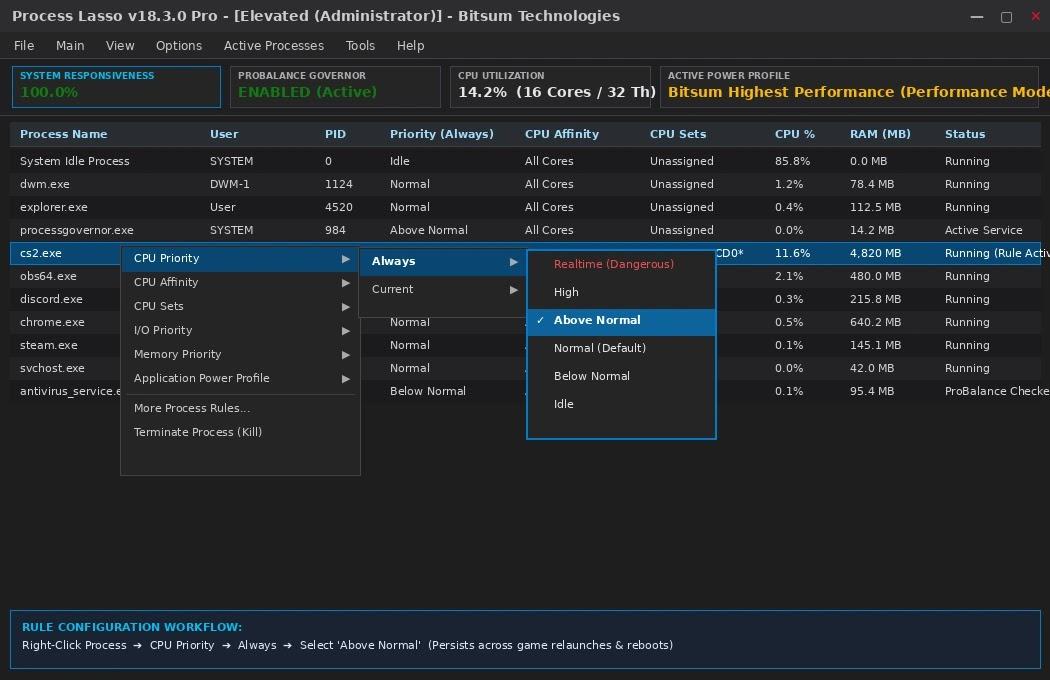
You can right-click any program in Process Lasso to assign permanent process rules. Keep your favorite game at Above Normal priority, set heavy background updates to Below Normal, and configure CPU affinity or CPU Sets.
Key Features of Process Lasso
Process Lasso provides a complete toolkit for performance optimization and custom system control. Here are the core technologies that keep your PC running at its best every day.
ProBalance
ProBalance is Process Lasso’s famously effective dynamic priority optimization engine that keeps your PC responsive during heavy CPU loads. It continuously watches running processes and automatically rebalances the priorities of any that start monopolizing the CPU, so your foreground apps, games, and calls stay smooth. It works in real time with zero manual tuning, which is why it’s the feature most users notice first.
CPU Affinities
CPU Affinities let you set permanent CPU affinity rules so processes always run on your chosen set of CPU cores, every time they launch. Once configured, Process Lasso enforces these assignments automatically in the background, even across restarts. This gives you fine-grained control over which cores handle demanding or sensitive workloads.
CPU Sets
CPU Sets are a “softer” form of CPU Affinities that assign preferred cores rather than hard bindings. The process is guided toward your selected cores but Windows can still schedule its threads elsewhere when needed. It’s the ideal middle ground when you want to steer workloads without rigidly pinning them down.
Priorities
Permanent Priorities ensure your processes always launch with the priority class you specify, session after session. Process Lasso remembers and re-applies your settings automatically, so critical apps get the precedence they deserve and low-value background tasks stay out of the way. No more resetting priorities manually after every reboot.
Efficiency Mode
Process Lasso lets you control and persist Windows 11’s Efficiency Mode on a per-process basis. Marking a process as efficiency-mode designates it as not performance-critical, helping Windows keep it out of the way of your important work. Your preferences stick, so you configure it once and it stays enforced.
Disallowed Processes
Disallowed Processes immediately terminates any process matching your criteria the moment it appears. You define the rules by process name, path, or other attributes, and Process Lasso blocks unwanted software from running at all. It’s a simple, effective way to keep bloatware, miners, or rogue apps off your system.
Limit Instances
Limit Instances caps how many copies of a process may run within a user session. When a new instance would exceed your limit, Process Lasso automatically terminates the excess. This is perfect for reining in apps that spawn endless duplicates and eat into your memory and CPU.
Instance Balancer
Instance Balancer spreads CPU cores across the running instances of an application instead of letting them pile onto the same cores. Each instance gets its own slice of processing power, which smooths out contention on multi-core systems. Multi-instance workloads like renderers, servers, and test rigs benefit the most.
CPU Limiter
CPU Limiter dynamically and temporarily caps a process’s CPU utilization when it crosses a threshold you define. For example, you can tell Process Lasso: if a process sustains 90% CPU for 10 seconds, throttle it back to 40% for 30 seconds. The limit lifts automatically afterward, so misbehaving apps get disciplined without being killed.
Group Extender
Group Extender enables processor-group-unaware applications to make full use of CPUs with more than 64 logical cores. Older or unoptimized software that can only see the first processor group gets transparently extended across all available groups. On high-core-count workstations and servers, this unlocks performance that would otherwise sit idle.
Power Profile Automation
Power Profile Automation switches your Windows power plan based on conditions you choose. IdleSaver drops to a power-saving plan when the system goes idle and restores full performance the moment you return, while process-triggered rules switch plans when specific apps are running. A manual Keep Awake timer is included for presentations, downloads, and overnight jobs.
Prevent Sleep (Keep Awake)
Process Lasso can prevent your PC from sleeping for a specified amount of time or whenever selected processes are running. This keeps long renders, uploads, backups, and remote sessions alive without you touching the mouse. When the timer expires or the process ends, normal sleep behavior resumes automatically.
Disable Hyper-Threading or SMT
This feature dynamically disables Hyper-Threading (or SMT) on a per-process basis while leaving it enabled system-wide. Some workloads, especially certain games and latency-sensitive apps, perform better or behave more predictably on physical cores alone. Process Lasso applies the setting automatically whenever the matched process runs.
Advanced Watchdog Rules
Advanced Watchdog Rules let you define custom triggers and responses based on resource consumption or other criteria. When a matched process crosses your thresholds for CPU, memory, or more, Process Lasso can terminate it, restart it, change its priority, log the event, or take other actions. It’s a programmable safety net for servers and unattended systems.
Multi-select Operations
Multi-select Operations let you select several processes at once and apply an action to all of them in one step. Terminate a whole group of hung processes, change priorities across a batch, or adjust affinities together instead of one by one. It’s a real time-saver when managing busy systems.
Configuration Profiles
Configuration Profiles let you create and switch between multiple complete rule configurations. Keep separate profiles for gaming, work, battery saving, or server duty, and activate whichever fits the moment. Each profile stores its own full set of rules, ready to apply instantly.
More…
Process Lasso includes numerous other features and functions beyond the list above, from logging and automation to deep system tuning options. The best way to discover them is to install it and explore the interface yourself. New capabilities are added regularly with each release.
Advanced CPU management features rely on Windows scheduling capabilities, including Windows CPU Sets , which allow applications to control processor resource allocation.
Process Lasso for Gaming and Professional Workloads
Whether you are competing in ranked games or finishing tight client deadlines, Process Lasso preserves system stability. It balances resources so heavy tasks never steal power from interactive software.
Improve Gaming Performance
Average FPS numbers do not tell the whole story. Frame pacing and 1% low frame rates dictate whether gameplay feels truly smooth. In CPU-heavy titles, Process Lasso protects gaming performance by stopping background processes from causing stutter.
In competitive PC gaming titles like Counter-Strike 2, Valorant, and Apex Legends, you can raise process priority to Above Normal, use CPU Sets to isolate physical cores, and trigger Performance Mode automatically.
For a more detailed breakdown, explore our guide to Process Lasso settings for gaming and learn how to configure the key options for a smoother gaming experience.
For simulation and heavy titles like Escape from Tarkov and DCS World, Process Lasso prevents background clutter from interrupting physics calculations and pins games to high-cache processor dies. Broadcasters can also reserve dedicated cores for their game while routing OBS Studio and browser overlays to secondary cores. Be sure to use free benchmarking tools like CapFrameX or RivaTuner Statistics Server to verify real smoothness improvements on your PC.
Optimize Heavy Applications and Workloads
Professional workstations running heavy rendering workloads can easily push all CPU cores to 100% load. Process Lasso ensures you can keep working smoothly during long rendering or export passes.
In 3D animation environments, you can run hours-long Blender or Cinema 4D renders while keeping your mouse cursor and desktop productivity applications fluid. Software developers can compile massive codebases in the background without dropping frames on video conference calls. System administrators can also assign dedicated processor cores to virtual machines in VMware or Docker so guest systems never slow down the main Windows desktop.
Process Lasso vs Windows Task Manager
Many users ask why they need Process Lasso when Windows already includes Task Manager. While Task Manager is a helpful viewer, it is not an automated manager.
| Feature / Dimension | Windows Task Manager | Process Lasso | Functional Benefit |
|---|---|---|---|
| Primary Role | Interactive system viewer | Automated background governor | Works silently without babysitting |
| Rule Persistence | None (resets upon restart) | Permanent across reboots | Saves all priority and affinity rules |
| Thread Governance | Manual priority changes only | Automated ProBalance algorithm | Prevents desktop lockups dynamically |
| CPU Core Management | Basic affinity masks | CPU Sets & hybrid core routing | Better stability on modern silicon |
| Power Management | None | Event-driven power plan switching | Engages high performance during games |
| System Overhead | Requires open GUI window | Headless service (< 15 MB RAM) | Uses virtually zero system resources |
To compare other diagnostic tools like Sysinternals Process Explorer and System Informer, explore our comprehensive comparison guide.
Download Process Lasso for Windows
Downloading and installing Process Lasso takes less than two minutes. The official installer packages are digitally signed, lightweight, and completely free of third-party toolbars or bundled adware.
Windows 64-Bit (x86-64)
Windows 11 / 10 / 8.1 / 7 (64-bit)
Windows 32-Bit (Legacy)
Windows XP / Vista / 7 / 8 / 10 (32-bit)
Windows Server Edition
Windows Server 2012 through 2025
Follow these simple steps for your first-time setup:
Frequently Asked Questions
Legal & Trademark Disclosure:
Process Lasso® and ProBalance® are registered trademarks of Bitsum Technologies. This website is an independent technical resource hub providing educational guides, configuration tutorials, and optimization advice. All software downloads should be verified directly through official Bitsum Technologies distribution channels.
