
Process Lasso Group Extender: How It Helps Applications Use More CPU Cores
Process Lasso Group Extender is an advanced resource management feature designed to help compatible applications access available CPU resources on high-core-count systems where Windows processor group limitations restrict core visibility. On modern multi-core processors featuring more than 64 logical processors, Windows divides hardware into distinct CPU groups by default, confining standard applications to a single group and preventing full multi-core utilization. By coordinating thread scheduling via the background governor service (processgovernor.exe), the Group Extender enables compatible software to span multiple processor groups, optimizing resource availability across workstations, servers, and high-performance computing environments.
What Is Process Lasso Group Extender?
Process Lasso Group Extender serves as a specialized utility that overcomes native operating system boundaries on high-core-count processors. As hardware engineering pushes core counts well beyond traditional limits, Windows architecture organizes logical processors into groups of up to 64 threads to maintain backward compatibility with legacy APIs.
While this grouping structure protects older software, it inadvertently restricts modern multi-threaded applications, rendering engines, and server workloads that were not explicitly coded to query multi-group APIs. The Group Extender solves this limitation by extending application visibility, allowing compatible software to utilize all available processor cores across multiple groups seamlessly.
Why Windows CPU Groups Limit Application CPU Usage
Windows processor groups represent a foundational structural constraint within the Windows NT executive. Because legacy Windows APIs and older application binaries can only address a maximum of 64 logical processors within a single affinity mask, systems featuring more than 64 threads must partition hardware into separate groups.
Consequently, standard applications launching on high-core-count workstations or multi-socket servers are automatically confined to Group 0. Even if a processor boasts 128 or 256 logical cores, unoptimized applications remain blind to any processing power outside their initial group boundary.
Understanding Windows Processor Groups
Windows processor groups organize system logical processors into discrete administrative units, each capped at 64 logical processors. This partitioning allows the Windows NT kernel to manage complex processor topologies efficiently while preserving compatibility with older software architectures. However, this architectural design means that high-end consumer processors and multi-socket enterprise servers appear to the operating system as a collection of separate processor domains rather than a single unified computing pool.
Windows processor groups organize system logical processors into discrete administrative units, each capped at 64 logical processors. Windows processor groups documentation
Why Some Applications Cannot Use All CPU Cores
Many software applications, including professional rendering tools, scientific simulations, and older multi-threaded games, were designed before high-core-count processors became mainstream. These programs rely on standard Win32 APIs that default to querying only the primary processor group. As a result, an application restricted to Group 0 will report 100% core utilization while dozens of additional cores in subsequent processor groups sit completely idle, severely limiting parallel processing throughput.
High Core Count CPUs and CPU Group Limitations
Processor group limitations become immediately apparent on modern enthusiast processors and enterprise server platforms featuring 16, 24, 32, or more physical cores with simultaneous multithreading enabled. When total logical processors exceed 64, Windows mandatory grouping behavior takes effect. Without specialized intervention, users running compute-intensive workloads on these advanced hardware platforms fail to harness the full processing capacity they purchased, leaving valuable computing performance untapped.
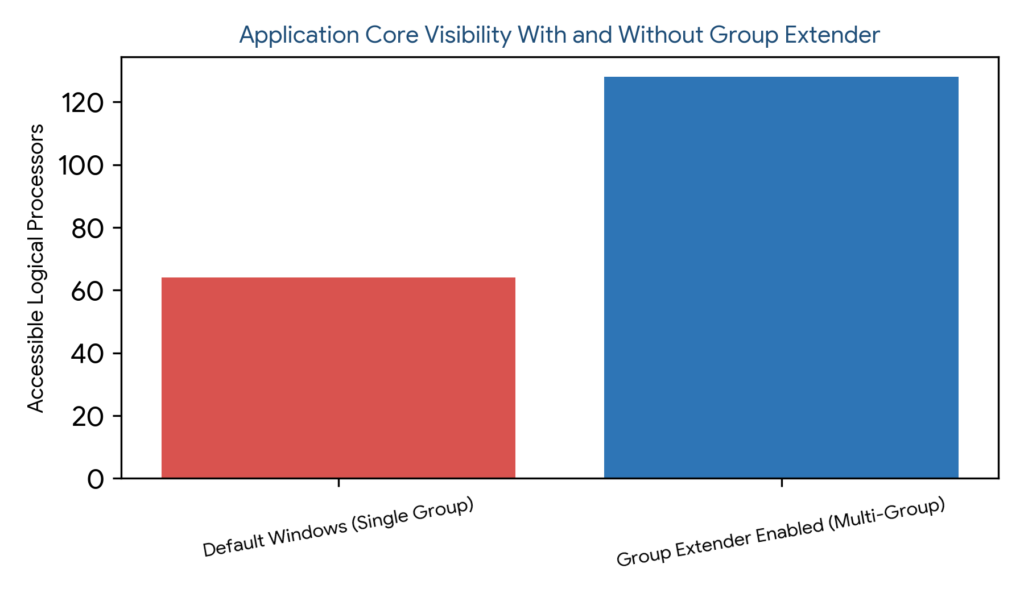
Figure 1: Application core visibility comparison illustrating restricted access under default Windows single-group assignment versus expanded processor visibility enabled by Process Lasso Group Extender
How Process Lasso Group Extender Works
The working principle of the Group Extender relies on the privileged background service (`processgovernor.exe`) interacting with Windows NT executive APIs to intercept and modify process startup parameters. When a targeted application launches, Process Lasso expands its processor group visibility.
This background service management bridges the gap between unoptimized application binaries and complex multi-group system topologies, allowing software to distribute threads across secondary and tertiary processor groups without requiring application code modifications. The scheduling technologies behind these operations are part of the broader Process Lasso Algorithms system used for advanced Windows optimization.
| Configuration Aspect | System Mechanism | Application Impact | Operational Benefit |
|---|---|---|---|
| Group Expansion | Multi-group API translation | Spans threads across Groups 0, 1+ | Access to all physical cores |
| Governor Service | processgovernor.exe integration | Background orchestration | Automated system-level policy enforcement |
| Compatibility Rules | Executable image matching | Targeted multi-core scaling | Prevents instability in fragile apps |
Process Lasso Group Extender Settings and Configuration
Managing Group Extender behavior involves defining application-specific rules through the desktop user interface. Administrators navigate to the process rules manager to enable group extension for demanding executables that require multi-group access.
Persistent configuration parameters are stored safely within `C:\ProgramData\ProcessLasso\config\prolasso.ini`, ensuring that custom group extension rules survive system reboots and background service restarts. For additional details about advanced settings files and system options, review the Process Lasso Configuration.
Enabling Group Extender for Applications
Activating the Group Extender for specific programs requires selecting the target executable within the Process Lasso rules interface and checking the appropriate group extension option. This targeted approach ensures that only compatible multi-threaded software receives multi-group privileges.
Configuring Applications With Group Extender
Application-specific configuration allows operators to test how individual software pipelines respond to expanded core availability. Observing CPU utilization telemetry helps administrators confirm whether target programs successfully leverage secondary processor groups.
Managing Group Extender Compatibility Options
Compatibility considerations are vital because not all legacy applications are architected to handle multi-group execution stability. Administrators should test group extension thoroughly on complex software to ensure error-free operation.
Process Lasso Group Extender and CPU Core Utilization
The primary impact of the Group Extender centers on maximizing CPU core utilization across high-end hardware platforms. By breaking down artificial operating system partitions, the utility transforms how multi-threaded workloads interact with massive core counts.
This enhanced utilization ensures that expensive multi-processor hardware delivers its full computational potential during demanding professional tasks.
Improving Application CPU Core Availability
Increasing available processor resources directly addresses the core starvation experienced by unoptimized applications on many-core CPUs, unlocking dormant processing power across secondary groups.
Optimizing High Core Count Processors
Processors featuring 16, 24, 32, or more physical cores derive immense benefit from group extension, as it bridges the gap between monolithic hardware architecture and Windows legacy group partitioning.
Improving Multi-Core Application Performance
While performance gains depend heavily on an application’s internal parallelization architecture, the Group Extender removes the primary operating system bottleneck preventing multi-threaded software from scaling across large core pools.
Process Lasso Group Extender Use Cases
Practical deployment scenarios for the Group Extender span professional workstations, enterprise database servers, 3D rendering pipelines, and high-performance computing clusters. Each environment demands unhindered access to massive processor pools.
System administrators leverage group extension to solve severe core utilization bottlenecks in specialized computational workflows.
Process Lasso Group Extender for Workstations
High-end engineering workstations running complex CAD software, video production suites, and digital audio workstations utilize the Group Extender to ensure heavy plugins and export tasks harness every available hardware thread.
Process Lasso Group Extender for Servers
Enterprise servers hosting virtual machine hypervisors, database engines, or backend API workers benefit from group extension by eliminating processor group barriers that could otherwise throttle multi-threaded query execution.
Process Lasso Group Extender for Rendering and Professional Applications
3D ray-tracing renderers and scientific simulation software scale exceptionally well across massive core counts. The Group Extender ensures these professional pipelines utilize secondary processor groups without manual script workarounds.
Process Lasso Group Extender for High Performance Computing Workloads
High-Performance Computing (HPC) environments running complex mathematical models and parallelized data analysis scripts rely on unobstructed core visibility to minimize job completion times.
| Deployment Environment | Primary Workload Type | Core Bottleneck | Group Extender Solution |
|---|---|---|---|
| High-End Workstations | CAD & Video Editing | Single-group software limits | Expands core visibility beyond 64 threads |
| Enterprise Servers | Databases & API Workers | Multi-socket isolation | Unifies core access across processor groups |
| Rendering Rigs | Ray-tracing & Simulation | Idle secondary cores | Maximizes parallel thread throughput |
| HPC Clusters | Scientific Computation | Topology partitioning | Removes OS scheduling constraints |
Process Lasso Group Extender vs Other CPU Management Features
Distinguishing between the Group Extender and other Process Lasso CPU management features prevents configuration confusion and ensures proper tool selection. Each feature addresses distinct layers of the Windows NT scheduling hierarchy.
Understanding these functional distinctions allows administrators to combine features into an integrated, highly effective system optimization framework.
Group Extender vs CPU Affinity
While CPU Affinity manually assigns processes to specific physical or logical cores within a given boundary, the Group Extender specifically expands an application’s structural visibility across multiple processor groups on high-core systems.
Learn more about multi-instance workload distribution in our Process Lasso Instance Balancer.
Group Extender vs CPU Sets
CPU Sets establish low-level container scheduling constraints provided by the Windows kernel, whereas the Group Extender acts as an overarching compatibility feature overcoming multi-group architectural ceilings.
Group Extender vs Instance Balancer
The Instance Balancer distributes multiple concurrent copies of an application across available cores, whereas the Group Extender assists a single application instance in accessing cores residing outside its default processor group.
Group Extender vs CPU Limiter
The CPU Limiter actively restricts processing time when resource utilization spikes past defined thresholds, contrasting directly with the Group Extender’s objective of expanding maximum core accessibility.
For workload restriction strategies rather than core expansion, explore the Process Lasso CPU Limiter.
Benefits of Using Process Lasso Group Extender
The primary advantages of deploying the Process Lasso Group Extender include unhindered access to massive CPU resources, optimized hardware utilization on high-core systems, and robust support for advanced multi-processor architectures.
These benefits ensure that modern enterprise hardware delivers maximum computational value across demanding professional workflows.
Helping Applications Access More CPU Resources
Lifting operating system grouping barriers ensures that compatible multi-threaded software can utilize every available hardware thread, eliminating artificial performance bottlenecks.
Improving CPU Utilization on High-Core Systems
Transforming idle secondary processor groups into active computational pools maximizes overall hardware efficiency and return on investment for high-end server and workstation builds.
Supporting Advanced Multi-Processor Systems
Providing seamless compatibility across multi-socket and high-core-count architectures makes Process Lasso an indispensable administrative tool for modern enterprise environments.
Troubleshooting Process Lasso Group Extender Issues
Troubleshooting configuration anomalies requires verifying application compatibility, checking Windows processor group topologies, and ensuring the background governor service (`processgovernor.exe`) is running with proper privileges. For additional solutions related to configuration and compatibility issues, consult the Process Lasso Troubleshooting.
Group Extender Not Increasing CPU Core Usage
When core usage fails to increase, operators should verify whether the target application possesses internal multithreading limitations that prevent it from scaling beyond a specific thread count regardless of operating system visibility.
Applications Still Limited to One CPU Group
If an application remains confined to a single group, reviewing Process Lasso rule settings, confirming background service execution status, and checking system architecture configurations resolves most persistence issues.
Checking Application Compatibility With Group Extender
Testing application behavior through structured monitoring helps administrators determine whether specific software benefits from multi-group extension or requires standard single-group execution to maintain stability.
