
Process Lasso Disable SMT: Should You Turn Off SMT or Hyper-Threading?
Short answer: for most users, no. Simultaneous Multithreading (SMT) — Intel’s Hyper-Threading — usually improves performance by letting each physical core do two things at once. But there are cases where disabling it for a specific application makes sense, and Process Lasso lets you do that per app without touching your BIOS. This guide explains what SMT is, when to leave it alone, and how to control it with Process Lasso.
What Is SMT and How Does It Work?
SMT (Simultaneous Multithreading), known as Hyper-Threading on Intel CPUs, exposes two logical CPU cores for every physical core. It works by sharing the physical core’s computational units between the two logical cores. When the two paired threads need different CPU resources, they can run simultaneously — putting hardware to work that would otherwise sit idle.
SMT (Simultaneous Multithreading), known as Hyper-Threading on Intel CPUs, exposes two logical CPU cores for every physical core. It works by sharing the physical core’s computational units between the two logical cores. When the two paired threads need different CPU resources, they can run simultaneously putting hardware to work that would otherwise sit idle. Intel Hyper-Threading Technology provides additional technical details about how Intel’s Hyper-Threading works.
SMT vs Physical Cores vs Logical Processors
A physical core is the actual hardware. A logical processor is what Windows sees — with SMT on, each physical core appears as two logical processors. Threads are the units of work the OS schedules. So an 8-core CPU with SMT shows 16 logical processors in Task Manager: 8 physical cores, each doubled.
How AMD SMT and Intel Hyper-Threading Work
They are the same concept under different brand names: AMD calls it SMT, Intel calls it Hyper-Threading. Both split each physical core into two logical processors that share execution resources.
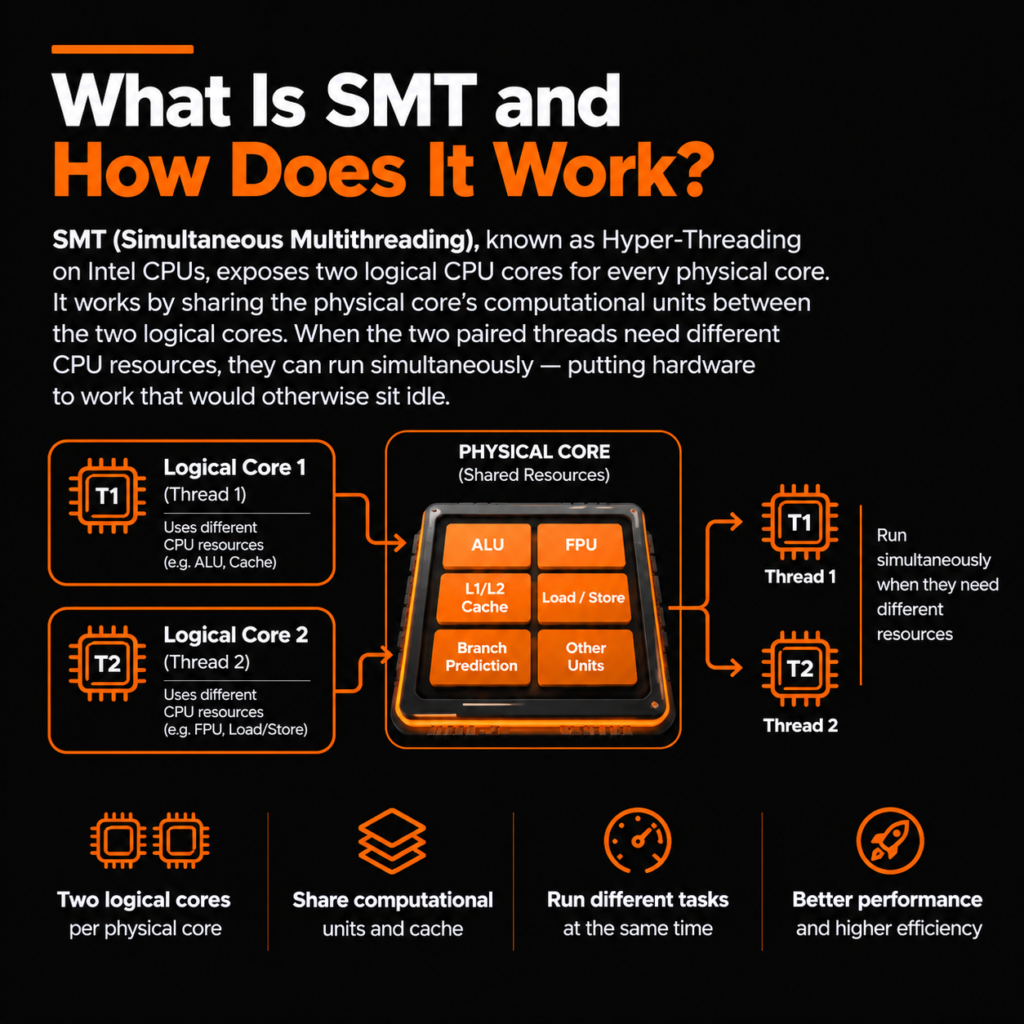
SMT allows two logical threads to share the resources of a physical CPU core and execute tasks simultaneously.
What Does Process Lasso Do With SMT?
Does Process Lasso Disable SMT?
No. Process Lasso does not change BIOS-level SMT settings — SMT stays enabled system-wide. Instead, it offers Hyper-Threaded Core Avoidance: per-process control that keeps a specific application off the logical (non-physical) cores.
How Process Lasso Handles Logical Processors
Through CPU affinity rules, Process Lasso can restrict an application to physical cores only, steering its threads away from the paired logical cores. The rest of the system keeps using SMT normally — only the applications you choose are affected.
Process Lasso SMT Settings and Configuration Options
There is no single “on/off” SMT switch in Process Lasso. Control is done through CPU affinity rules saved per application, so the setting is permanent and applies every time the app launches.
Process Lasso Rules let you save application-specific CPU affinity settings permanently, so your chosen SMT configuration can automatically apply whenever the application launches.
How To Disable SMT Using Process Lasso
These steps restrict an application to physical cores — the per-app equivalent of disabling SMT for that program:
Should You Disable SMT? Pros and Cons Explained
- More consistent performance for real-time applications that are sensitive to resource sharing between paired threads.
- A way to test whether thread contention is behind odd performance behavior in a specific workload.
- Fewer available threads: heavily multithreaded work gets less total throughput.
- Reduced multitasking capability when many applications run at once.
- Some applications perform measurably worse without SMT — early Hyper-Threading only added about 10% per logical core, but modern implementations contribute far more.
SMT On vs SMT Off: Performance Comparison
If your goal is controlling how aggressively a demanding application consumes processor resources rather than restricting specific cores, Process Lasso CPU Limiter provides another approach.
When the objective is maintaining responsiveness while heavily threaded applications compete for CPU resources, Process Lasso ProBalance provides automated workload balancing without disabling SMT.
Before changing SMT behavior, users optimizing demanding applications can also explore Process Lasso Performance Mode , which targets system responsiveness through different performance-management settings.
Process Lasso SMT vs BIOS SMT Disabling: What’s The Difference?
| Method | Scope | Reversible |
|---|---|---|
| BIOS SMT disable | Entire system — every application loses SMT | Yes, in BIOS |
| Process Lasso SMT control | Specific applications only; rest of system unaffected | Yes, delete or edit the rule |
Common Questions About Process Lasso and SMT
Final Recommendation: Should You Disable SMT With Process Lasso?
Keep SMT enabled for most users and most software — modern CPUs and the Windows scheduler are built around it. Test SMT-off behavior per application for specific real-time or contention-sensitive workloads, using Process Lasso’s affinity rules so the change stays scoped to that one app. That gives you the experiment without the commitment of a BIOS-wide switch.
Disclosure: This is an independent guide and is not affiliated with or endorsed by Bitsum LLC, the maker of Process Lasso.
