
What Is SmartTrim in Process Lasso? Does It Improve RAM Performance?
Process Lasso SmartTrim is an advanced memory management feature designed to optimize how applications utilize system RAM by managing working set memory rather than simply forcing raw memory release like traditional RAM cleaners. Users frequently explore SmartTrim to understand whether it improves system responsiveness, gaming performance, or overall RAM efficiency under heavy multitasking workloads. By coordinating memory trimming via the background governor service (processgovernor.exe), SmartTrim works harmoniously with the Windows memory manager to reduce unnecessary memory pressure. This technical guide explores how SmartTrim functions, working set management, RAM performance impacts, configuration settings, benefits, limitations, and troubleshooting workflows across modern Windows environments. To download the process Lasso, visit the Process Lasso Download hub.
What Is Process Lasso SmartTrim?
Process Lasso SmartTrim is a sophisticated memory optimization utility engineered to manage application memory usage intelligently and reduce unnecessary memory pressure across Windows systems. Its primary purpose is to enhance overall system memory efficiency by trimming inactive working set pages without inducing the aggressive page fault penalties associated with legacy third-party RAM cleaners.
SmartTrim focuses specifically on working set memory management, collaborating directly with the operating system rather than overriding native memory allocation algorithms. Systems with limited physical RAM, heavy multitasking workflows, and memory-intensive professional applications benefit substantially from this controlled memory regulation.
How Process Lasso SmartTrim Works
The working mechanism behind SmartTrim relies on continuous oversight by the privileged background service executing under the SYSTEM account via the Windows Service Control Manager. The governor queries native Windows NT executive APIs to monitor application memory consumption and detect high memory pressure situations. The memory management technologies behind SmartTrim are part of the wider Process Lasso Algorithms framework used for system optimization.
Rather than replacing Windows memory management, SmartTrim complements it by identifying inactive working set allocations and signaling the operating system to release idle memory pages back to the free pool, ensuring resources remain available for active foreground tasks.
Understanding Memory Trimming in Process Lasso
Memory trimming involves removing inactive memory pages from active process working sets, reducing unnecessary memory allocation and allowing Windows to manage available physical RAM efficiently. When applications sit idle in the background, their working sets often retain pages that are no longer actively required. SmartTrim identifies these dormant pages and trims them gently, helping systems with constrained memory resources maintain smooth responsiveness during intensive multitasking sessions.
Memory trimming involves removing inactive memory pages from active process working sets, reducing unnecessary memory allocation and allowing Windows to manage available physical RAM efficiently. Understanding how the Windows memory manager handles memory allocation helps explain how tools like SmartTrim optimize working set behavior. Windows memory management overview
How SmartTrim Manages Application Memory Usage
Managing application memory usage requires a balanced approach that avoids forcing every background program to release all of its allocated memory simultaneously. SmartTrim monitors consumption patterns and targets background applications whose working sets have expanded beyond reasonable thresholds. This intelligent filtering prevents stuttering and disk paging, ensuring that applications retain necessary cached data while relinquishing unused memory back to the system pool.
SmartTrim and Windows Working Set Memory
Windows working set memory represents the subset of physical RAM currently allocated and visible to active processes. The Windows memory manager adjusts working sets dynamically, but background programs frequently hold onto memory pages long after activity ceases. SmartTrim interacts directly with these working set boundaries, issuing targeted API calls to prompt the kernel to reclaim idle memory without destabilizing running applications.
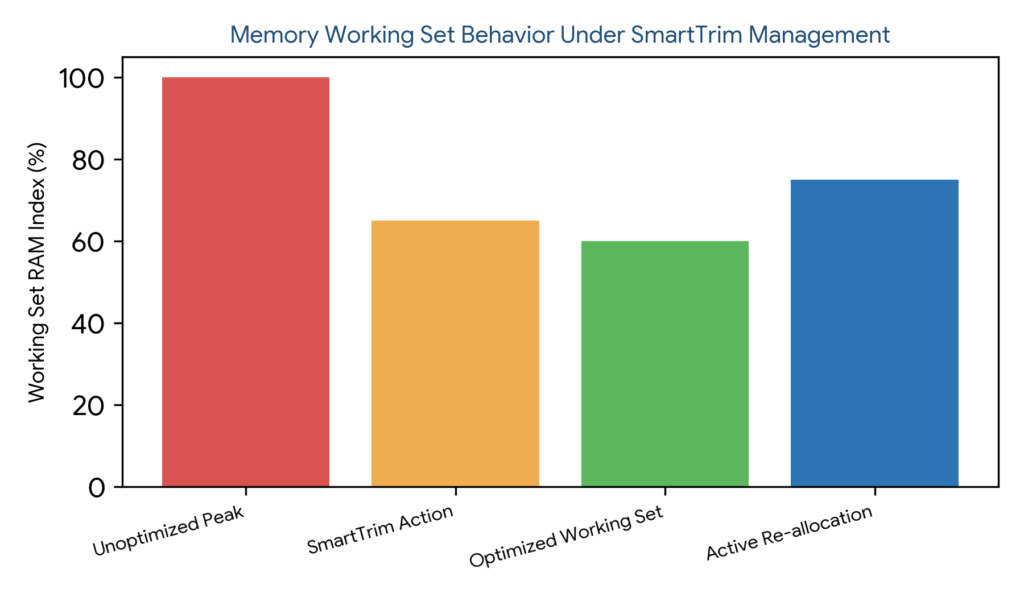
Figure 1: Memory working set behavior curve illustrating unoptimized peaks, SmartTrim action intervention, optimized working set maintenance, and active re-allocation.
Does Process Lasso SmartTrim Improve RAM Performance?
SmartTrim improves memory efficiency and reduces memory pressure in specific multitasking scenarios, though it does not increase physical RAM capacity. Users should maintain realistic expectations regarding performance enhancements, as SmartTrim is designed to optimize resource allocation rather than magically accelerate hardware clock speeds.
Under heavy memory pressure, reducing bloated background working sets creates a more fluid multitasking environment, preventing sluggishness and excessive paging without claiming guaranteed frame rate increases or arbitrary speed boosts.
This cooperative approach avoids the performance penalties associated with aggressive, brute-force RAM cleaning utilities.
| Optimization Approach | Operating Mechanism | Impact on System Stability | Performance Outcome |
|---|---|---|---|
| Process Lasso SmartTrim | Cooperative working set trimming | High stability (works with OS) | Reduces memory pressure smoothly |
| Traditional RAM Cleaner | Forced memory eviction | Low stability (causes page faults) | Often induces stuttering and lag |
Process Lasso SmartTrim Settings and Configuration
options through the Process Lasso settings menu. Persistent configuration parameters are stored safely within C:\ProgramData\ProcessLasso\config\prolasso.ini, guaranteeing rule retention across system reboots. For additional information about configuration files, paths, and advanced settings, review the Process Lasso Configuration.
Adjusting SmartTrim behavior according to specific computing environments ensures that memory management aligns perfectly with hardware capabilities and user preferences.
How to Enable SmartTrim in Process Lasso
Activating SmartTrim requires accessing the Process Lasso settings interface via the primary application menu, locating the memory management section, and checking the option to enable SmartTrim. Applying changes initiates background memory monitoring instantly.
Process Lasso SmartTrim Options Explained
Available SmartTrim controls allow operators to customize memory management preferences, adjust monitoring sensitivity, and define exclusion criteria for sensitive applications that require static working sets.
Configuring SmartTrim Memory Management Behavior
Tailoring SmartTrim behavior to specific usage scenarios involves configuring thresholds appropriately for gaming rigs, professional workstations, or everyday productivity machines to maximize memory efficiency without causing application instability.
How Process Lasso SmartTrim Handles RAM Usage
Practical RAM management under SmartTrim focuses on reducing unused memory from inactive applications, managing background processes effectively, and preventing excessive memory consumption during heavy workloads.
These mechanisms ensure that available physical RAM remains dedicated to active tasks rather than sitting idle in bloated background working sets.
Reducing Unused Memory From Applications
Handling inactive application memory involves identifying programs that have minimized to the background or remain idle for extended periods, prompting the operating system to reclaim their unused memory pages.
Managing Background Application Memory Usage
Web browsers, chat applications, game launchers, and utility programs frequently accumulate large memory footprints over time. SmartTrim monitors these background applications, curbing excessive RAM consumption without requiring manual user intervention.
Preventing Excessive RAM Consumption
Mitigating memory-heavy situations prevents total system sluggishness by curbing runaway working set growth, maintaining high system responsiveness across all running software.
Process Lasso SmartTrim Benefits and Limitations
A balanced evaluation of SmartTrim highlights its advantages in improving memory efficiency and reducing memory pressure during heavy workloads, alongside acknowledging limitations where memory optimization may offer minimal gains.
Understanding these boundaries helps users deploy SmartTrim effectively in environments where memory constraints genuinely impact performance. For broader system efficiency improvements beyond memory optimization, explore Process Lasso Power Management and automated workload controls.
Improving Memory Efficiency on Windows Systems
The primary benefits of SmartTrim include enhanced RAM utilization, smoother multitasking performance, and the reduction of unnecessary memory bloat across running applications.
Reducing Memory Pressure During Heavy Workloads
During demanding tasks such as video editing, software compilation, or running multiple virtual machines, SmartTrim alleviates memory pressure, helping large projects execute without paging stalls.
When SmartTrim May Not Improve Performance
Systems equipped with abundant free physical RAM, or environments running specialized applications that already manage working sets efficiently, may experience negligible performance changes when SmartTrim is enabled.
| Optimization Method | Automation Level | System Integration | Primary Use Case |
|---|---|---|---|
| Windows Native | Automatic kernel management | Deep OS integration | Standard background memory allocation |
| Process Lasso SmartTrim | Automated working set governance | Cooperative OS extension | Mitigating heavy background RAM bloat |
| Manual Optimization | Manual user intervention | Standalone utility execution | Ad-hoc task manager cleanup |
Process Lasso SmartTrim for Gaming and Heavy Applications
Managing memory performance during gaming sessions and resource-heavy workloads requires careful consideration. SmartTrim assists gaming setups by controlling background application memory usage, ensuring maximum RAM availability for active game titles.
Professional software such as video editors, rendering suites, and development environments also benefit from stabilized working set trimming during heavy multitasking workloads.
SmartTrim and Gaming Memory Performance
During gaming, SmartTrim curtails background RAM bloat from launchers and browsers. While it does not provide arbitrary frame rate guarantees, it helps prevent stuttering caused by sudden background memory allocation spikes.
SmartTrim for Resource-Heavy Applications
Demanding software applications like video editing suites, 3D rendering pipelines, and integrated development environments generate heavy memory demands. SmartTrim assists these tools by ensuring the operating system keeps RAM pages available for active project timelines.
SmartTrim During Multitasking Workloads
Handling numerous open browser tabs, background utilities, and productivity applications simultaneously becomes significantly more manageable when SmartTrim actively prevents background working sets from consuming excessive physical memory.
Process Lasso SmartTrim vs Other Memory Optimization Methods
Contrasting SmartTrim with Windows native memory management, traditional RAM cleaners, and manual optimization methods clarifies its unique role in system tuning. Each method approaches RAM allocation differently. Users managing both memory pressure and processor usage can also explore the Process Lasso CPU Limiter for CPU resource control scenarios.
Understanding these distinctions empowers users to select the most stable and effective memory management strategy for their specific computing needs.
SmartTrim vs Windows Memory Management
While Windows manages memory automatically through kernel paging algorithms, SmartTrim introduces supplemental optimization behavior that targets bloated background working sets more aggressively than default operating system routines.
SmartTrim vs RAM Cleaner Applications
Traditional RAM cleaner applications force immediate memory release, frequently destabilizing applications. SmartTrim utilizes controlled, cooperative memory management that coordinates with the kernel to release pages safely.
SmartTrim vs Manual Memory Optimization
Manual optimization requires constant user intervention via task manager cleanups, whereas SmartTrim automates memory management continuously in the background without user distraction.
Troubleshooting Process Lasso SmartTrim Issues
Resolving SmartTrim configuration anomalies involves verifying feature status, checking permission boundaries, and reviewing background service execution parameters. Addressing these common problems ensures optimal memory optimization performance. For additional solutions related to Process Lasso feature failures and configuration problems, consult the Process Lasso Troubleshooting.
Process Lasso SmartTrim Not Working
When SmartTrim appears inactive, operators should check feature status in the settings menu, review configuration files for syntax errors, and restart Process Lasso to reinitialize the background governor service.
SmartTrim Settings Not Applying
Permission restrictions or configuration file write blocks can prevent updated settings from taking effect. Verifying administrative privileges and checking prolasso.ini permissions resolves application failures.
SmartTrim Not Reducing Memory Usage
Memory usage depends heavily on active application demands. If SmartTrim does not reduce memory usage, it usually indicates that running programs actively require their allocated working sets and cannot safely release memory pages.
How to Disable SmartTrim in Process Lasso
Turning off SmartTrim involves unchecking the feature toggle within the Process Lasso settings menu and saving changes, instantly restoring default Windows memory management behavior.
