
Process Lasso Instance Balancer: How It Spreads Processes Across CPU Cores
Process Lasso Instance Balancer is an advanced resource allocation feature designed to automatically distribute multiple instances of the same application across available CPU cores, preventing simultaneous workloads from competing for identical processor resources. By coordinating thread scheduling via the background governor service (processgovernor.exe), the utility detects when multiple copies of an application run concurrently and dynamically assigns core allocations to maintain balanced hardware utilization. This technical guide covers instance balancing mechanics, CPU distribution algorithms, configuration options, multi-instance use cases, and performance advantages across modern Windows NT environments. For additional Process Lasso documentation, optimization resources, and technical guides, visit the Process Lasso Download resource hub.
What Is Process Lasso Instance Balancer?
Process Lasso Instance Balancer serves as a sophisticated automation tool for managing multi-process workloads and concurrent application instances. When users launch multiple copies of demanding software, such as gaming clients, server worker processes, or financial trading platforms, default Windows thread scheduling often clumps all instances onto the same physical or logical cores.
This resource concentration creates severe CPU contention, cache thrashing, and performance degradation. The Instance Balancer resolves this inefficiency by automatically identifying duplicate application executables and spreading their threads across distinct processor cores, ensuring optimal hardware utilization and stable execution performance.
How Process Lasso Instance Balancer Works
The working mechanism of the Instance Balancer relies on continuous process monitoring conducted by the privileged background service executing under the SYSTEM account via the Windows Service Control Manager. The governor queries native Windows NT executive APIs to track process creation and termination events in real time.
Process Lasso CPU Limiter works alongside Windows CPU scheduling to manage excessive CPU usage and temporarily restrict CPU-intensive processes when they exceed configured thresholds. Windows CPU scheduling documentation
When multiple instances of a designated application are detected, the background service evaluates available processor topology and applies dynamic affinity or CPU Set rules. The decision-making systems behind these balancing operations are part of the wider Process Lasso Algorithms framework. As instances launch or close, the balancer automatically recalculates core distributions to maintain balanced resource allocation.
Understanding Process Instance Balancing in Process Lasso
Process instance balancing revolves around recognizing that duplicate executables running simultaneously share identical processing traits but compete aggressively for local cache and execution units. Treating these instances independently allows Process Lasso to isolate their execution threads across separate processor domains. This isolation prevents inter-instance interference, ensuring that each running copy operates with predictable responsiveness even under heavy system load.
How Process Lasso Distributes Processes Across CPU Cores
Distributing processes across CPU cores involves mapping active instance IDs to specific hardware thread groups. By parsing system topology through Windows NT executive APIs, the background governor assigns non-overlapping core subsets to each detected instance. This structured core separation minimizes cache contention on modern multi-core architectures, allowing parallel workloads to execute with maximum throughput and reduced latency.
Automatic CPU Core Balancing When Instances Change
Dynamic balancing behavior ensures that core allocations adapt fluidly whenever instances are added or removed. If a user closes one game client or server worker, Process Lasso instantly redistributes the remaining active instances across the available processor pool. This automated adjustment eliminates the need for manual affinity reconfiguration every time a multi-instance workload changes size.
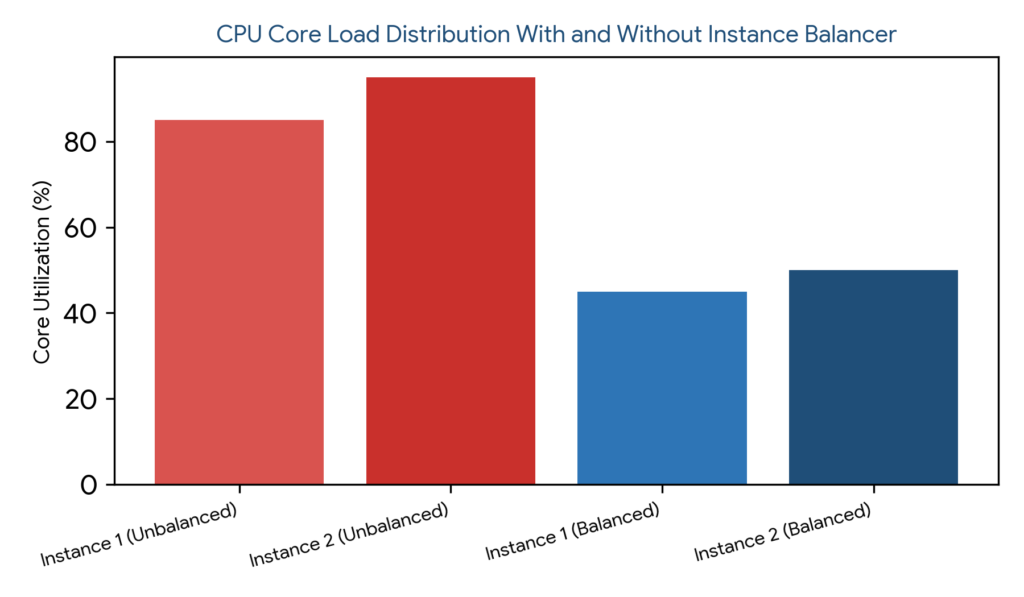
Figure 1: CPU core utilization comparison demonstrating severe core saturation under unbalanced multi-instance execution versus balanced distribution achieved by Process Lasso.
Process Lasso Instance Balancer Settings and Configuration
Configuring the Instance Balancer involves defining specific rules that instruct the background governor on how to handle multi-instance applications. Administrators navigate through the desktop interface to Options > Rules Manager > Instance Balancer to establish target application parameters.
Establishing clear configuration baselines ensures that multi-instance workloads adhere to predictable resource allocation standards without requiring constant operator oversight. For deeper customization of settings files, paths, and advanced options, see the Process Lasso Configuration.
| Allocation Method | Core Distribution Logic | Primary Performance Benefit | Ideal Operational Scenario |
|---|---|---|---|
| Equal CPUs Per Instance | Divides available cores evenly | Fair resource sharing | Multi-client gaming or parallel testing |
| Fixed Core Count | Assigns dedicated core blocks | Predictable execution limits | Server worker processes and bots |
| Dynamic Distribution | Shifts cores based on load | Flexible workload scaling | Mixed application environments |
Process Lasso CPU Allocation Methods for Instances
The Instance Balancer supports multiple allocation methods to accommodate diverse hardware configurations and software demands. Choosing the correct allocation strategy ensures that multi-process environments achieve optimal execution efficiency.
Understanding these allocation algorithms allows administrators to fine-tune processor distribution, mitigating bottlenecks on both consumer desktop processors and enterprise server hardware. For applications that require broader CPU core utilization strategies, explore Process Lasso Group Extender and its approach to expanding application core usage.
Equal CPUs Per Instance Allocation
Equal CPUs Per Instance allocation divides the available processor pool evenly across all active copies of an application. For example, running four instances on an eight-core processor assigns exactly two dedicated cores to each instance.
This method is exceptionally useful for multi-client gaming setups where each game instance requires identical computing power to maintain consistent frame pacing.
Fixed Core Count Per Instance Allocation
Fixed Core Count allocation assigns a strict, predetermined number of processor cores to each newly launched instance regardless of total running copies. This approach guarantees predictable performance parameters for dedicated server workloads and specialized simulation software.
Dynamic CPU Core Distribution Between Instances
Dynamic CPU core distribution continuously recalculates core assignments based on real-time system load and fluctuating instance counts. This adaptive method maximizes hardware flexibility in environments where application concurrency changes unpredictably.
Advanced Process Lasso Instance Balancer Options
Advanced controls within the Instance Balancer empower power users and enterprise administrators to manage complex hardware topologies, including NUMA architectures, reserved core pools, and SMT configurations.
Persistent parameters for these advanced options are stored securely in C:\ProgramData\ProcessLasso\config\prolasso.ini, ensuring enterprise-grade rule retention across reboots.
Process Lasso NUMA Instance Balancing
NUMA-aware instance balancing optimizes memory and CPU locality across Non-Uniform Memory Access architectures found on multi-socket enterprise servers. By keeping instance threads and memory allocations within the same NUMA node, the balancer minimizes inter-socket latency.
Managing Reserved CPU Cores for Instances
Managing reserved CPU cores allows administrators to carve out dedicated processor headroom for critical operating system tasks or foreground user interfaces while letting the Instance Balancer distribute remaining cores among background instances.
Using CPU Thresholds With Instance Balancer
Integrating CPU usage thresholds with the Instance Balancer ensures that core redistribution triggers only when system workload reaches specified intensity levels, preventing unnecessary scheduling shifts during idle periods.
Disabling Hyper-Threading (SMT) for Instance Balancing
Configuring instance balancing to target physical cores exclusively helps avoid the scheduling noise associated with simultaneous multithreading (SMT), ensuring cleaner execution isolation for heavy multi-process pipelines.
Process Lasso Instance Balancer Process Matching
Accurate process matching is essential for the Instance Balancer to identify and group multiple running copies of target applications correctly. Precise matching ensures that rules apply exclusively to intended software binaries.
Matching Multiple Process Instances Automatically
Automatic instance detection scans process creation telemetry reported by the Windows NT executive, instantly recognizing when a second or subsequent copy of a registered executable initializes in memory.
Using Advanced Process Matching With Instance Balancer
Advanced process matching allows operators to establish nuanced criteria using absolute file paths and specific directory structures, ensuring that identically named binaries in different software packages do not trigger unintended balancing actions.
Wildcard and Regex Process Matching for Instance Balancing
Employing wildcard characters and regular expression patterns enables administrators to govern broad families of related worker processes and dynamically named application instances under a single unified balancing rule.
| Advanced Option | Technical Mechanism | System Environment | Administrative Objective |
|---|---|---|---|
| NUMA Balancing | Node-aware thread locality | Multi-socket servers | Minimizes inter-socket memory latency |
| Reserved Cores | Exclusion mask allocation | High-load workstations | Protects OS headroom from workers |
| CPU Thresholds | Load-gated activation | Dynamic environments | Prevents unnecessary core shuffling |
| Physical Core Focus | SMT / Hyper-threading bypass | Performance-critical setups | Eliminates logical core contention |
Process Lasso Instance Balancer Use Cases
Practical deployment scenarios demonstrate the immense value of the Instance Balancer across multi-client gaming setups, enterprise server environments, and parallel professional computing pipelines. Applying targeted instance balancing resolves complex multi-process bottlenecks.
Power users and system administrators leverage these practical use cases to extract maximum hardware performance from multi-core processors without manual thread management.
Managing Multiple Game Instances
Gamers running multiple MMO clients or sandbox game instances simultaneously often suffer from severe frame drops due to core saturation. The Instance Balancer spreads each game client across distinct core sets, ensuring smooth frame pacing across all active windows.
Balancing Server Application Instances
Server administrators managing multiple database worker threads, game server shards, or backend application instances utilize the balancer to prevent worker processes from colliding on shared hardware threads, ensuring stable transaction rates.
Optimizing Multi-Process Workloads
Professional environments running parallel compilation scripts, scientific simulations, or batch rendering tools benefit significantly from automated core distribution, reducing total completion time and thermal throttling.
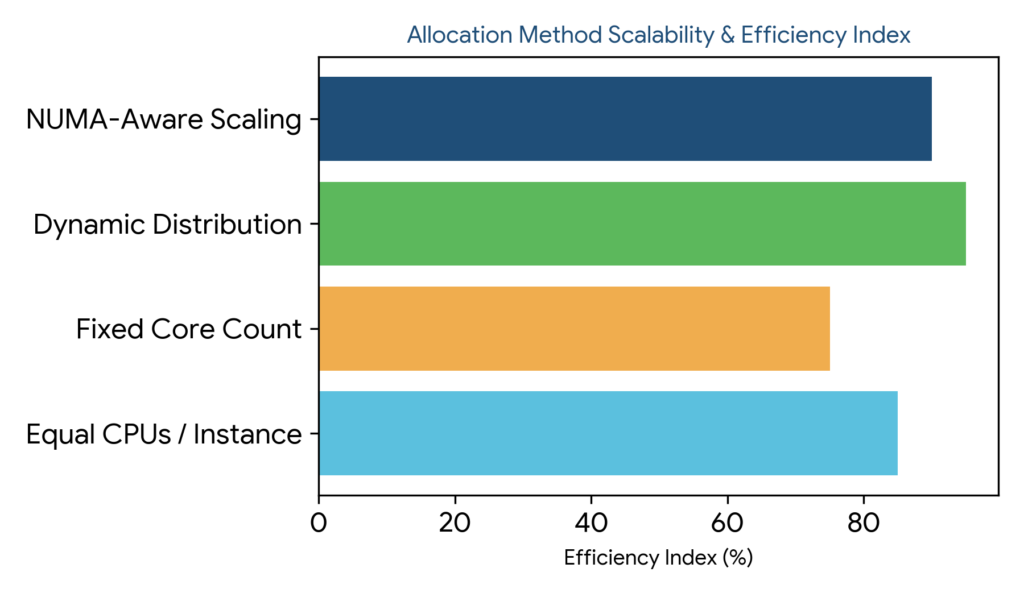
Figure 2: Allocation method scalability and efficiency index across Equal CPUs Per Instance, Fixed Core Count, Dynamic Distribution, and NUMA-Aware Scaling approaches.
Process Lasso Instance Balancer vs Other CPU Management Features
Distinguishing between the Instance Balancer and other Process Lasso CPU management features prevents configuration confusion and ensures proper tool selection. Each feature is architected to address distinct optimization challenges within the Windows NT executive.
Understanding these functional boundaries allows operators to combine features into a comprehensive, multi-layered system tuning strategy.
Instance Balancer vs CPU Affinity
While static CPU Affinity manually assigns a specific process to hardcoded cores, the Instance Balancer automates this process dynamically, calculating and distributing core assignments across multiple concurrent copies of an application without manual intervention.
Instance Balancer vs CPU Limiter
The CPU Limiter restricts overall processing time when utilization spikes past defined thresholds, whereas the Instance Balancer focuses exclusively on spatial core distribution to prevent multi-instance resource collisions.
Instance Balancer vs CPU Sets
CPU Sets provide low-level Windows container affinity constraints, while the Instance Balancer operates as a higher-level management engine coordinating core distribution across varying instance counts dynamically.
Benefits of Using Process Lasso Instance Balancer
The primary advantages of deploying the Process Lasso Instance Balancer include superior resource distribution, elimination of inter-instance CPU contention, and maintained system responsiveness under heavy multi-process loads.
These benefits ensure a fluid, highly responsive computing experience even when running demanding parallel software pipelines.
Improving CPU Resource Distribution Between Processes
Spreading workloads evenly across available silicon prevents resource concentration, maximizing overall processor efficiency and thermal dissipation.
Preventing Multiple Instances From Competing for CPU Cores
Eliminating direct core competition between duplicate application instances stops cache thrashing and inter-thread stalls, leading to smoother execution stability.
Maintaining Better System Responsiveness
Ensuring that multi-process workloads do not saturate primary execution queues preserves operating system fluidity, preventing mouse stutter and UI freezing.
Troubleshooting Process Lasso Instance Balancer Issues
Troubleshooting configuration anomalies requires verifying executable matching strings, reviewing core availability, and ensuring the background governor service (`processgovernor.exe`) is running with proper privileges.
Instance Balancer Rules Not Applying
When balancing rules fail to activate, operators should verify that target process image names match exact binary strings and that no conflicting global affinity overrides are present in the configuration file.
Processes Not Being Distributed Across CPU Cores
Failing to distribute processes usually indicates insufficient logical cores in the system processor pool or improper allocation mode settings within the rule configuration menu.
Incorrect CPU Allocation Between Instances
If core distribution appears uneven, reviewing allocation preferences, reserved core masks, and threshold settings helps restore proper balancing behavior across all active application copies.
